How many cameras a shop needs and where to put them
Shop cameras are counted zone by zone: entrance, tills, sales floor, stockroom and back door. Each zone explained, with blind spots and a worked example.
6 min read
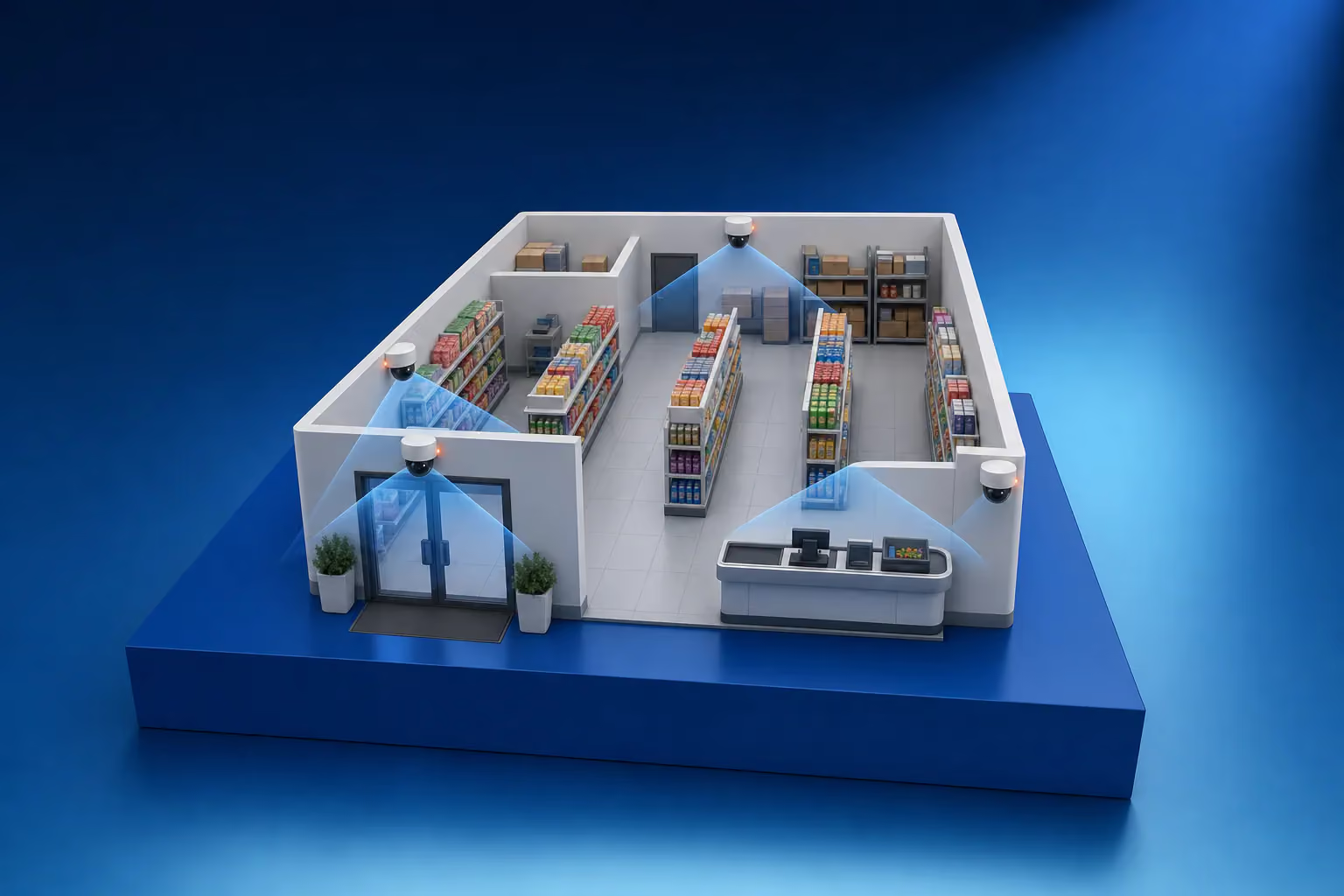
The number of cameras a shop needs is counted zone by zone. A small shop with one entrance and one till needs at least four: one on the entrance, one on the till, one on the sales floor and one on the stockroom or the back door. Every extra entrance, till, row of tall shelving and separate room adds one or two more.
Why floor area is a poor guide
Two shops of 100 m² can need very different systems. An open floor with low displays can be watched from two points. A floor of the same size with rows of shelving up to the ceiling needs a camera for almost every aisle, because a shelf blocks the view as completely as a wall. So the count starts from the shop plan and a list of tasks: who and what must be visible in each zone.
Entrance
Every customer passes through the entrance, so this is where the recording has to show a recognisable face. The camera points at the doorway with a narrow field of view and is mounted at 2.2–2.5 m, so it captures faces and not the tops of heads. The street outside is bright in daytime, so the camera needs wide dynamic range (WDR), or people coming in turn into dark silhouettes. Each customer entrance gets its own camera.
Tills
At the till, detail matters: the cashier's hands, the cash drawer, the banknote, the goods on the counter and the customer. The camera goes above the till and slightly in front of it, looking down at the counter. A general camera on the sales floor will not show this detail. Each till usually needs its own camera, and some systems can overlay receipt data on the video, so a disputed sale can be found by amount or time.
Sales floor
On the sales floor the aim is to follow a person without a break from the entrance along the aisles to the till. A panoramic camera on the ceiling covers a small open room in one view, although detail falls off towards the edges of the image. Tall shelving needs cameras along the aisles. Shelves with small, expensive goods such as alcohol, cosmetics or electronics get a separate close-up camera.
Stockroom, deliveries and the back door
In the stockroom the questions are who came in and what left. Two views usually cover it: one on the door and one along the racks. Stockroom lights are often off for most of the day, so the camera needs infrared or a low-light sensor.
Customers never see the back door, yet stock comes and goes through it. The camera here shows the door and the unloading area. If it is mounted outside, it needs a weatherproof housing and night vision, because deliveries also arrive after dark.
Where blind spots hide
- Behind tall shelving, pillars and promotional stands.
- In corners and at the far ends of aisles.
- Directly below a wall-mounted camera, where it does not look.
- In the passage between the sales floor and the stockroom.
- Behind a hanging banner or light fitting that blocked the view after installation.
Cameras are placed so their views overlap, with each one covering the area beneath its neighbour. A shop keeps changing, and a new stand or a seasonal display can block a view that was clear on installation day. After every rearrangement, open all the cameras and check the picture. Our article on CCTV maintenance lists what else a routine check covers.
A worked example for a convenience store
Take a shop with one customer entrance, two tills, a sales floor with four rows of shelving, a stockroom and a back door.
| Zone | Cameras | Task |
|---|---|---|
| Entrance | 1 | Faces of people coming in and going out |
| Tills | 2 | One camera above each till |
| Sales floor | 3 | A panoramic ceiling camera plus two cameras along the aisles it cannot see |
| Alcohol shelf | 1 | A close-up of high-value stock |
| Stockroom | 1 | The door and the racks |
| Back door and deliveries | 1 | An outdoor camera with infrared |
| Total | 9 |
Nine cameras call for a 16-channel recorder, leaving room for a new till or a second door. Our article NVR or DVR explains how to choose the recorder and size the disks for the archive.
Signs and cameras that cover staff
The Law of Georgia on Personal Data Protection requires a clearly visible sign in every area under video surveillance, with the contact details of the person responsible for the data. The law allows video monitoring of employees' workplaces only in exceptional cases, where the purpose cannot be achieved any other way, and staff must be told the purpose in writing. A camera above the till also sees the cashier, so its purpose is worth setting down in an internal document. Before installation, check the layout against the current text of the law, and take disputed cases to a lawyer.
How we count cameras for a shop
A LAGI engineer walks the shop with you, marks the zones and tasks on a plan and checks what each proposed position will actually see. Site surveys in Tbilisi are free. In the system design every camera has a reason to be where it is, so there are no spare ones. We then carry out the CCTV installation and set up viewing on your phone. Our security for shops page shows how cameras work together with alarms and access control. To book a survey, use the quote request form.
Frequently asked questions
How many days of shop footage should be kept?
The archive should cover the gap between stocktakes, or at least between till checks. A shortfall is often found weeks later, and by then the recording must still be on the disks. Most shops plan for two to four weeks and size the recorder's disks to match.
Does a shop need a CCTV sign?
Yes. The Law of Georgia on Personal Data Protection requires a clearly visible sign in every area under video surveillance, with the contact details of the person responsible for the data. Signs go at eye level in a well-lit spot at the entrance and near the cameras, and several cameras mean several signs.
Can one panoramic camera cover a whole shop?
In a kiosk or a very small shop it can, if it hangs in the centre of the ceiling. It shows the whole room, but a face at the entrance or a banknote at the till near the edge of the image is hard to make out. So even a small shop usually adds a separate camera on the till and on the entrance.
Which camera goes above the till?
A 4 MP camera with a narrow or varifocal lens, mounted above the till and slightly in front of it, looking down. That way it captures the cashier's hands, the cash drawer and the banknotes. Do not aim it at screens or lit displays, because the glare washes out the picture.